
The new iPhone app pulls in PSA slabs by cert number, frames them with museum lighting and metal plaques, and beams your grails to the big screen with CardCast. Yes, even the ones sitting in a vault.
Here’s a slightly awkward hobby truth. The better your cards get, the less you actually see them. Your grails are sleeved, slabbed, boxed, and in plenty of cases vaulted in a facility hundreds of miles away. They’re safe, sure. They’re also basically invisible.
Card Gallery wants to fix that, and it goes about it with serious style. Forget checklists and spreadsheets. This app is all about the showpiece.
A showroom, not a spreadsheet
Most collection apps are about tracking. Card Gallery is about displaying. The team puts it plainly on its site: free apps track your collection, and Card Gallery displays it. That one idea shapes the whole product.
You add your graded cards, arrange them in frames and collections, and then show them off. That can happen on your phone, on your TV, or through a shareable web page. It works for sports cards, Pokémon, and other TCGs, so pretty much any slab-loving collector is in the target audience.
It’s live now on the App Store for iPhone and iPad, and every download starts with a free three-day trial of the full experience.
The feature tour
CardCast: your grails, on the big screen
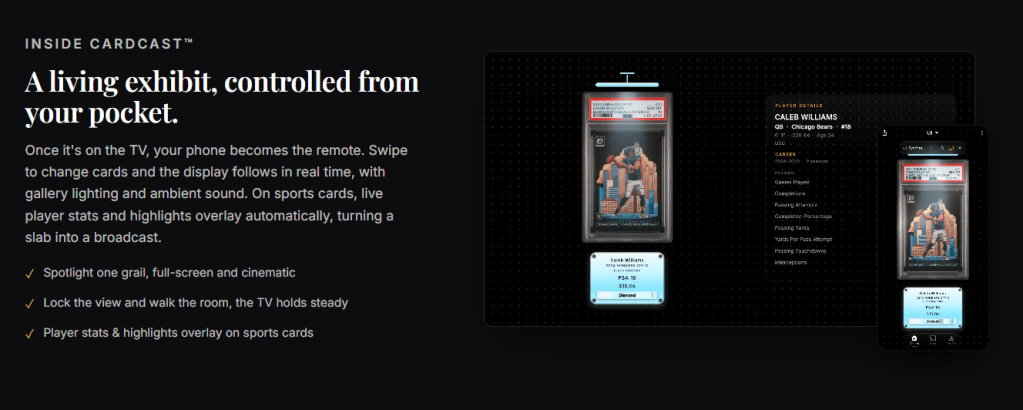
This is the signature feature, and it’s a showstopper. CardCast sends your cards to any TV over AirPlay or Chromecast. There are no cables and no setup. From there you can spotlight a single grail full-screen, or build a curated wall with museum lighting, framed plaques, and ambient sound.
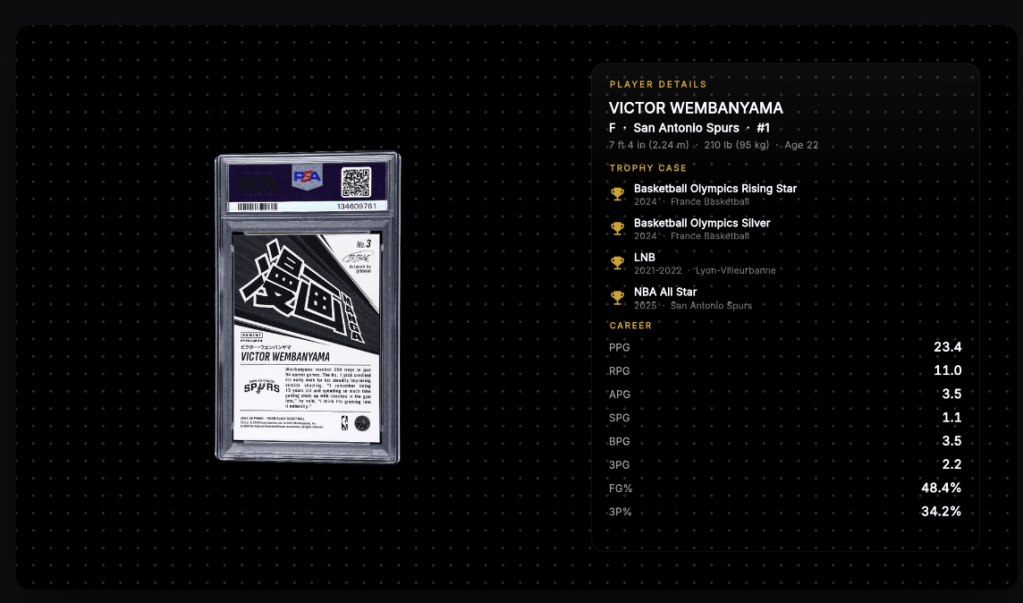
Your phone turns into the remote. Swipe to the next card and the TV follows in real time. You can also lock the display and walk around the room while the screen holds steady. And on sports cards, live player stats and highlights overlay automatically, which basically turns a slab into a broadcast. Game night just got a lot more interesting.
Type the cert, skip the work
Adding PSA cards is almost suspiciously easy. You just enter the cert number. Card Gallery saves the official PSA slab scan, then fills in the card details and market value on its own. You don’t need the card in hand, which is great news if your collection lives in a vault.
BGS, SGC, CGC, TAG, and other graded slabs add with a quick photo import. Raw-card support is listed as coming soon.
Frames fit for a grail
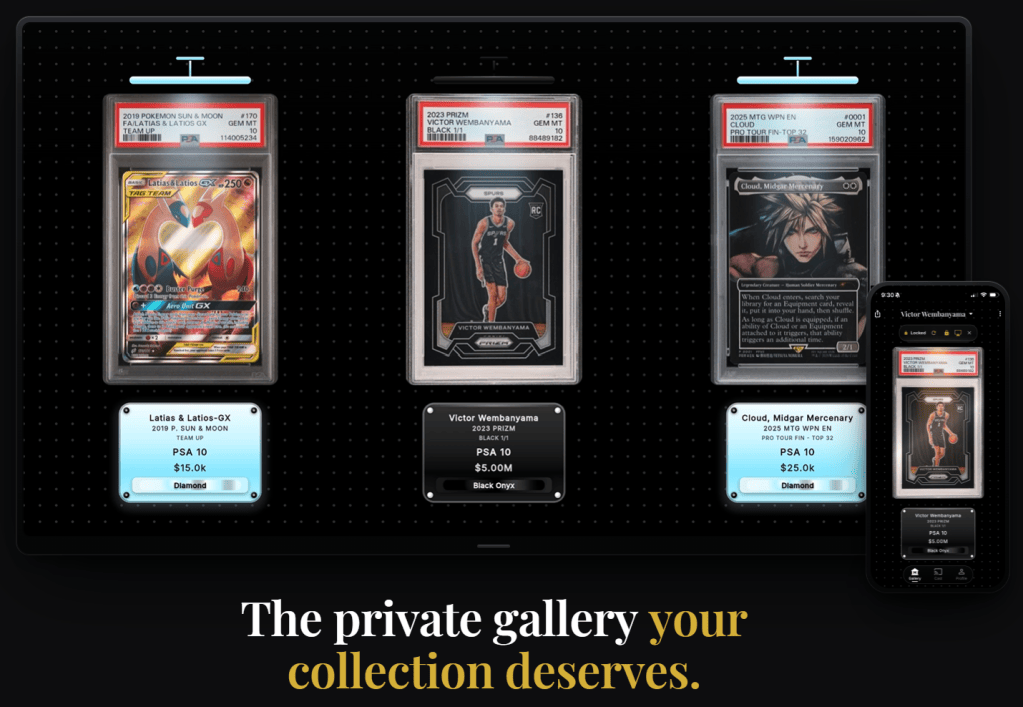
This is where the app really leans into the museum vibe. You can build custom multi-card frames and pick from three presentation styles: Art, Vault, or Classic. Each card sits in a frame with a gold, silver, or bronze metal plaque tuned to its grade. Ambient motion and lighting finish off the look.
Real value and live stats
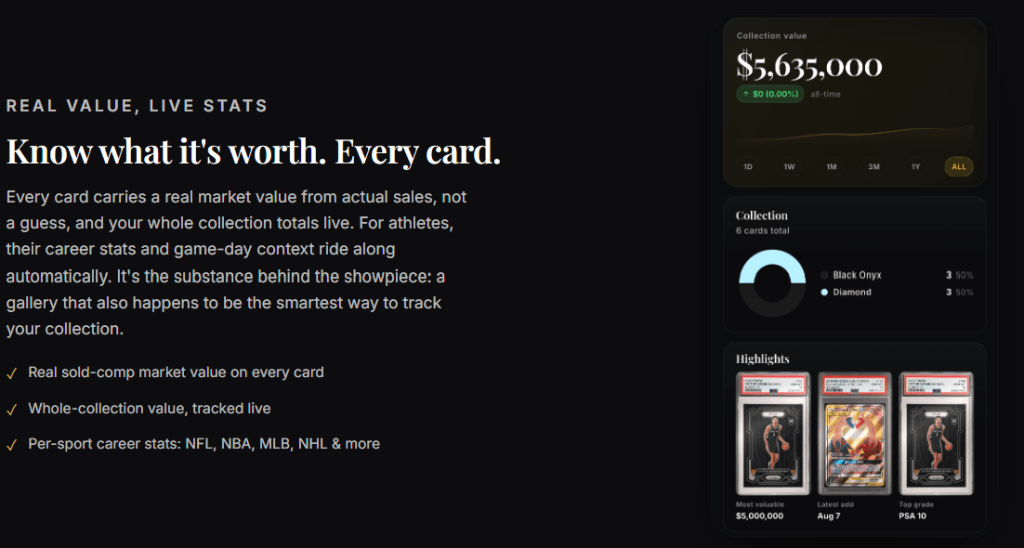
Under all the polish, there’s real substance. Every card carries a grade-aware market value pulled from completed sales and live listings, so a PSA 10 gets priced against PSA 10 sales. Your total collection value updates live, and you can always set a card’s value by hand. Sports cards also pick up career stats and game-day context across the NFL, NBA, MLB, NHL, and more. TCG cards show set and rarity details instead.
Share a showcase link
Want to show someone your collection? Publish a showcase link. Anyone can open your gallery in a browser without an app or an account. They’ll see your cards in your chosen display style, not a plain list, and you decide exactly what’s included. It’s perfect for a buyer, a trade partner, or the group chat.
What we love
It gives vaulted cards their spotlight back
Vaulting is one of the smartest moves in the modern hobby. It’s also one of the least fun. Card Gallery makes vaulted cards feel like yours again. Whether your slabs sit with eBay, PSA, Goldin, or another platform, a cert number is all it takes to put them on your living room TV. That’s a genuinely clever answer to a real collector pain point.
It celebrates the joy of the hobby
A lot of card tools talk about cards the way a brokerage talks about stocks. Card Gallery remembers that people collect because they love looking at this stuff. The lighting, the plaques, and the ambient sound are all about the feeling of owning something special. We’re here for it.
Privacy and a clean screen
Your collection is private by default, and the app can lock behind Face ID. Nothing goes public unless you publish a showcase. The membership model also means no ads and no sponsored cards cluttering your feed. It’s just your collection on the screen.
Simple, all-in pricing
There’s one membership, with no feature tiers to decode. It includes unlimited cards, full CardCast, PSA cert scans, and unlimited showcase pages. You can pay monthly or annually, and annual saves 25%. Either way, you get the three-day free trial first.
Good to know
Card Gallery is available on iPhone and iPad first. Android is on the roadmap. Showcase links already work in any browser on any device, though, so everyone can see your gallery even before the Android app arrives. Right now the app is built around graded slabs, and raw cards are still on the way.
The bottom line
Card Gallery isn’t trying to be another portfolio tracker. It’s trying to make your collection feel as special as it really is, and it pulls that off with a lot of flair. CardCast is the headline, but frictionless PSA cert imports, grade-aware values, and gorgeous share pages give it real substance underneath the shine.
If your best cards spend more time in a vault than in your hands, this one is worth a download. Grab Card Gallery on the App Store, start the free trial, and throw a grail up on the big screen. You might never go back to scrolling a checklist again.






Leave a comment